
Generations
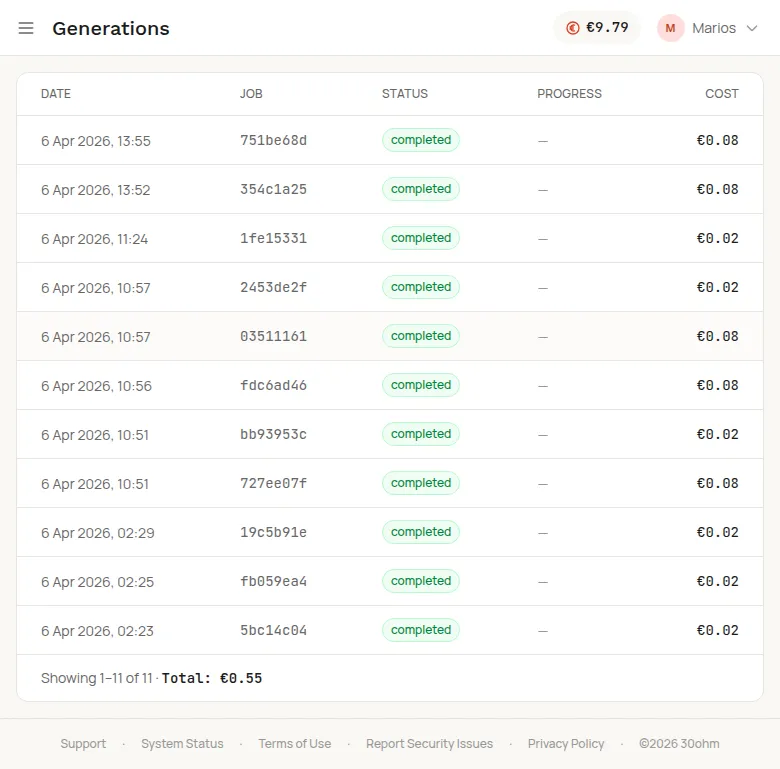
The Generations page shows all your past image generations in a table.
What you see
Section titled “What you see”Each row shows:
| Column | Description |
|---|---|
| Date | When the generation was created |
| Job | Short job ID (click to expand) |
| Status | completed, processing, pending, or failed |
| Progress | For stories: scenes completed / total |
| Cost | EUR amount charged |
The bottom of the table shows the total count and total cost.
Job details
Section titled “Job details”Click any row to see full details, including the prompt, model used, and image URLs. If the image hasn’t expired yet (URLs are valid for 1 hour after generation), you can view and download it directly from this page.
CLI and API access
Section titled “CLI and API access”You can also query your generation history programmatically:
depicta jobs listdepicta jobs get <job_id>API: GET /v1/jobs and GET /v1/jobs/{id}